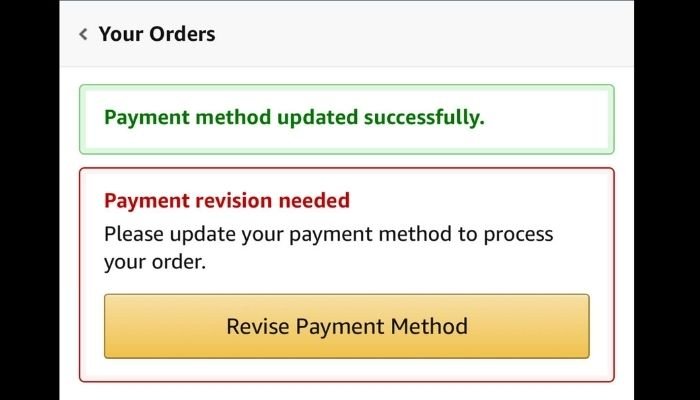

Have you ever found yourself puzzled by the frequent prompts from Amazon asking you to revise your payment method? It’s not just you.
Many shoppers encounter this seemingly mysterious request. While it might seem like a minor inconvenience, the reasons behind it are crucial for your online security and shopping experience. Understanding why Amazon nudges you to update your payment details can help you avoid potential shopping hiccups and protect your financial information.
We’ll unravel the mystery behind these notifications, offering you peace of mind and ensuring your next Amazon purchase goes smoothly. Stay with us as we dive into the practical reasons and smart tips to handle these prompts effectively.
Common Payment Method Issues
Cards can expire without notice. Amazon needs active cards for payments. Check your card’s expiry date. Update it if expired. This ensures smooth transactions. Online shopping requires valid payment methods.
Sometimes, accounts run low on funds. Amazon checks available balance before processing orders. Ensure your account has enough money. This helps avoid payment failures. It’s crucial for seamless purchasing.
Errors in card details can cause issues. Amazon requires correct information for verification. Double-check your card number and CVV. Ensure the billing address matches. Accurate info is important for successful payments.

Technical Glitches And Errors
Amazon sometimes updates its systems. These updates can cause temporary issues. You might see messages about revising your payment method. During maintenance, some features may not work. Don’t worry. These issues usually get fixed fast. Always check your account after updates. Ensure your payment details are correct. This can help avoid any future problems.
Errors can happen with payment gateways. Sometimes, payments don’t go through. This can cause Amazon to ask for changes in your payment method. The problem might be with your bank. Or it could be with the payment processor. Double-check your card details. Make sure your card is active and not expired. Contact your bank if problems continue. They might be able to help fix the issue.
Security And Verification Concerns
Amazon wants to keep your account safe. Sometimes, they see strange actions. These actions could be someone trying to use your account. Suspicious activity alerts are sent to protect you.
Amazon may ask you to revise your payment method. They do this to make sure it’s you. This helps stop bad guys from using your money. It’s important to take these alerts seriously.
Amazon checks if your payment details are correct. If something looks wrong, they ask you to check again. This keeps your information safe and up to date.
Sometimes, cards expire or get canceled. Amazon needs the right details to process orders. Always update any changes to your payment methods.
How To Update Payment Information
Amazon often asks to revise payment details. This can be due to expired cards or incorrect information. Start by logging into your Amazon account. Navigate to the “Payment Options” section. Select the card to update. Click on “Edit” and correct the information. Save changes to ensure successful updates.
Check for any typing errors in card number or expiry date. Confirm your billing address matches your card’s address. This prevents failed transactions. Always keep your card information up-to-date to avoid payment issues. Regular checks can help maintain smooth purchases.
Contacting Amazon Support
Amazon might ask you to revise your payment method. This can be confusing. It’s important to know when to contact their support. You should reach out if your payment doesn’t go through. Also, if you see repeated messages about your payment method. It’s crucial to ask for help before making another purchase. This ensures your account stays active.
When To Reach Out
You should contact support if you face issues. Problems like declined payments are common. Also, when you can’t update your payment details. This can happen if your card is expired. Or if there’s a mismatch in your billing information. Contacting them early can prevent future issues. It saves you time and worry.
Information Needed For Support
Before contacting support, gather important details. Have your account information ready. This includes your email and order number. Also, details about the payment method used. Note any error messages shown. Having this information helps the support team assist you faster. It makes the process smoother for everyone.


Frequently Asked Questions
Why Does Amazon Ask To Revise Payment Method?
Amazon may request a payment method revision due to expired cards, insufficient funds, or suspected fraudulent activity. Updating your payment details ensures smooth transactions and uninterrupted service. Always check your card’s expiration date and available balance to prevent such issues.
How Can I Update My Payment Method On Amazon?
To update your payment method, log into your Amazon account, go to “Your Account,” select “Payment options,” and add a new card. Make sure all details are correct, including card number and expiration date, to avoid further issues.
What Happens If I Ignore The Payment Revision Request?
Ignoring Amazon’s request to revise your payment method may result in order cancellations or service interruptions. Amazon won’t process transactions with outdated or invalid payment details. To ensure seamless service, promptly update your payment information.
Can Expired Cards Cause Payment Method Issues?
Yes, expired cards can cause payment issues on Amazon. If your card expires, Amazon can’t process payments. Always keep your card information updated, including expiration date, to prevent transaction problems and ensure uninterrupted service.
Conclusion
Understanding why Amazon prompts for payment updates is crucial. It ensures smooth transactions. Keeps your account secure. Regularly check and update your payment details. This prevents any shopping disruptions. Always verify your card information. Ensure it’s valid and has funds.
This simple habit avoids unnecessary stress. Stay alert for any unusual account activity. Prompt action protects your finances. A little vigilance goes a long way. Shopping on Amazon can remain hassle-free. So, keep your account details current. Enjoy a seamless shopping experience.
With peace of mind.